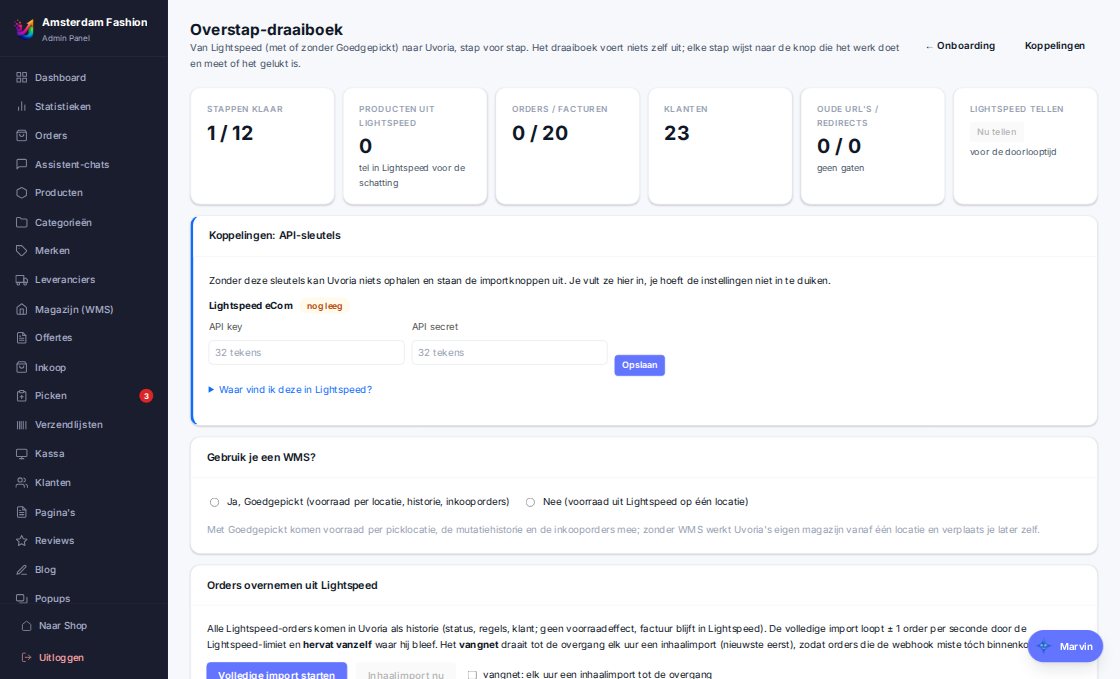
We did it ourselves with a store of tens of thousands of products and four languages. Everything that went wrong there is now a step in the runbook.
Migration import: your old store as a starting point
Give the URL of your current store. Uvoria screenshots and measures the pages, recognises the layout (header, category header, product page, footer), builds a draft theme with the same colours and structure, takes over the menu and prepares about twenty products as demo. A feature inventory shows what your old store could do and how Uvoria does it.
Works for Lightspeed, Shopify and any store with product data in the page
Popups and filters of the old store are recognised and taken over
The result reviews itself with screenshots and corrects
Lightspeed runbook
A step-by-step plan in the admin with facts and lead time: full catalogue (variants, brands, weight, meta), customers with a "set your password" welcome e-mail in batches, orders with progress and resume, discount codes, backorders from the old chain into the backorder lane. Imported orders deliberately never get a second invoice.
Visible products only, or everything
Neatly paced on the Lightspeed API: no blocks, several imports at once are safe
Redirects with a final check
Old URLs are harvested from sitemap and pages, redirects generated per language, gaps reported with a proposal and just before go-live every old URL is followed internally: ok, chain, loop, wrong host, soft 404. Only when that is green does the DNS switch.
410 for what deliberately disappears
404 log after go-live for what you missed
Transition period
An alias serves the store on the old and the new domain without redirecting until the moment you choose. Orders still running in the old system are reserved and deducted as soon as that system ships. An under-construction mode keeps the store closed for visitors but open for you, your devices and search engines.
Truth switch
One moment at which Uvoria becomes the source of truth for orders and stock. From then on paid orders from the old system go into Uvoria's pick lane, old stock webhooks are ignored and accounting runs from Uvoria. The switch flips automatically with an active own domain.
Checklist for the day itself
Take over Goedgepickt history into the stock log
Import & export via files
Products, customers, historical orders, categories, discount codes, redirects, newsletter and reviews via CSV or XLSX, in two steps (analyse, confirm). Column names are those of the export, so a round of export → edit → import always fits. Historical orders do not touch stock, payment or e-mail.
Onboarding with Marvin
After the invitation your store is ready with languages, VAT, e-mails and a published theme. The checklist ticks itself off based on facts; Marvin helps at every step and the migration import sits in the same flow.
No customer receives an e-mail during an import — ever
How it works
The runbook in four phases
1
Prepare
Invitation, 14 days trial, migration import of your old store, take over catalogue and customers.
2
Set up
Finish the theme with Marvin, languages, payment, shipping, accounting, redirects.
3
Transition
Alias on the old domain, orders from the old system reserved, final redirect check.
4
Go live
DNS switch, truth switch, watch the 404 log, the old system finishes its last orders.
We onboard new stores one at a time, so every migration gets the attention it deserves. Sign up and we will contact you personally as soon as we can connect you.