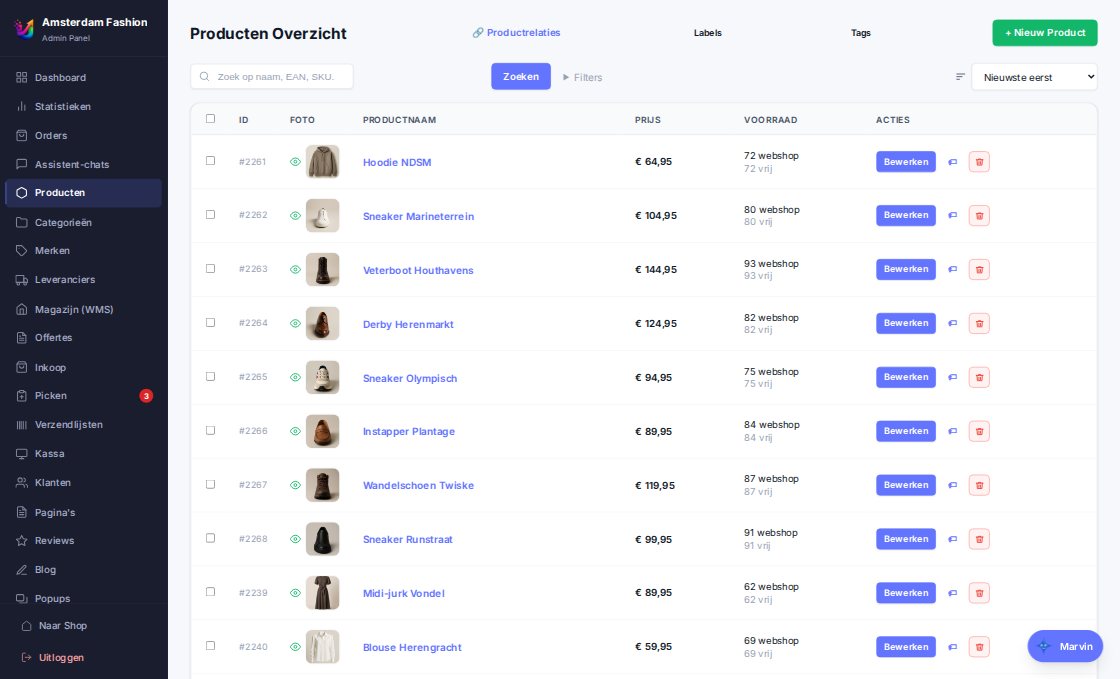
From catalogue to thank-you page. Every setting has a safe default, so a new store looks right from day one.
Product management
Products with variants, three-level categories, brands, tags, attributes and images. The sale price per variant with an optional period is a separate layer, so an import never overwrites a running promotion.
Sale with start and end date, scheduled ahead
Product labels: manual or automatic (new, on sale)
Pros/cons, specifications and tags per language
Bundles and combo deals with automatic discount
Themes and building blocks
Seven starter themes, including Lichtkrant with a glass header and square buttons. Header layouts, mobile menu, category header with subcategories, filter drawer or chips, product page with side column, accordion or sticky buy bar, homepage sections and footer layers — all configurable, no code.
Homepage: video hero, USP block, banners, tabs, countdown, top list, blog teasers
Category page: toolbar, filters, columns, pagination or infinite scroll
Describe the look you want and the editor adjusts your store live. Every line of CSS passes a guard that removes exactly the declaration that would hide the cart or buy button — and keeps the rest. Motion effects come from a catalogue; decorative animations run in a sandbox.
Draft → publish with rollback and revisions
Marvin redesigns and checks its own work with screenshots
A runtime guard measures in the browser whether the critical buttons stay visible
Search and filters
Search, sorting, a price filter with slider, a brand filter with counts and filtering on review score — without reloading if you like, and without JavaScript every filter remains a plain link. The price filter uses the price the customer actually pays.
Facets from attributes, cached for 5 minutes
Compare up to four products side by side
Tag and brand pages with their own URL per language
Checkout and payment
Billing and shipping address, business with VAT number (VIES check and reverse charge), discount code in cart and checkout, minimum order value and payment fees per method. Mollie receives address and order lines, so Klarna, in3 and Billie work too.
iDEAL, Bancontact, cards, Klarna, in3, Billie, PayPal via Mollie
Gift card as payment method, loyalty points as discount
Checkout closed without a configured payment provider — never an unpaid order
Missed webhooks are caught every quarter hour
Click & collect and backorders
Pick up in store with a pickup code on invoice, label and e-mail; scan and stamp at the counter, with reminders after one to four weeks. Backorder products stay orderable; you choose whether an order waits until everything is in, or the available part ships ahead for free or at a shipping fee.
"E-mail me when back in stock" per variant
Stock display: status, exact quantity or thresholds
Expected delivery date from open purchase orders
Speed and findability
Every image is served as WebP at the right width with srcset and lazy loading, fonts are self-hosted, the hot path lives in Redis. SEO URLs per language, hreflang, JSON-LD, breadcrumbs, a sitemap per host and a redirect engine with a 404 log.
Long product text collapsible without hiding anything from search engines
Meta descriptions per language, generated from the text
Weekly Lighthouse measurement per store
Customer account and personalisation
Account with order overview, invoices, reorder, address book and favourites. With Upod the store tunes lists, homepage and the assistant to the visitor's profile — without you storing anything about that visitor.
"Forgot password" turns a guest buyer into an account
Newsletter, blog and content pages per language
Cookie banner without tracking before consent
How it works
From theme to first sale
1
Pick a theme
Seven starters, or let the migration import rebuild the design of your old store.
2
Configure with building blocks
Header, category page, product page and footer are settings — or you ask Marvin.
3
Connect payment and shipping
Enter the Mollie key, tick shipping methods per country, done.
4
Publish
The draft goes live with one click; rollback is always possible.
We onboard new stores one at a time, so every migration gets the attention it deserves. Sign up and we will contact you personally as soon as we can connect you.