Not Marvin — he works for you in the admin. This is the assistant for your visitors: it carries your name, knows your catalogue and your policies, and handles sales and service like a good shop employee.
The assistant works with your real data: current stock and prices, the status from the warehouse, your return and warranty policy. It invents nothing — what it does not know, it says so.
Marvin or the Shopping Assistant?
Uvoria has two AIs, each with its own place. Marvin works for you and your team in the admin: bulk actions, reports, mailings, purchasing, design. Visitors never see him. The Shopping Assistant works for your visitors in the store, under the name and face you choose. It can do nothing in your admin and only sees what a customer may see.
Marvin: your colleague behind the scenes
Shopping Assistant: your employee on the shop floor
Advises and sells
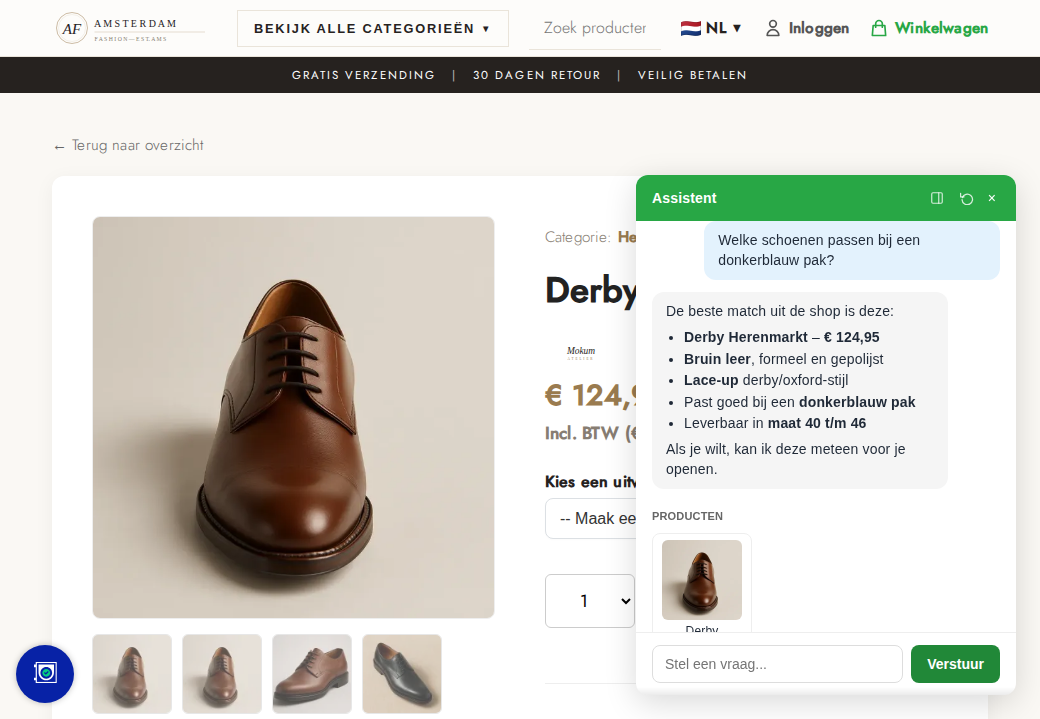
Searches your catalogue semantically — on meaning, not keywords — and shows products as cards with photo, price and stock. Adds to the cart, suggests matching products and applies a discount code. Choose "advisory" and it asks first; choose "direct" and it shows what fits right away.
Product cards from your own catalogue, current prices
With Upod: size and preferences from the profile, when the customer wants it
Order and pay in the chat
When the customer wants to order, the assistant asks for the details, fills the real checkout and only places the order after an explicit yes. With iDEAL the QR code sits in the chat; other methods finish on the payment page. The consent is stored with the order.
Where is my parcel?
After identification the assistant gives the status the way an employee would: paid, in the warehouse, shipped with a track & trace link and the carrier's phase, ready for pickup, or waiting for stock. Never an invented delivery date.
Track & trace from PostNL and Sendcloud
Partial shipments and backorders per line
Forgot something? Add-on order
"I forgot a cable" on a paid, not yet shipped order: the assistant first collects everything the customer still wants, shows the list with the total and asks whether anything else should be added. Only then comes one pay button — without shipping costs. After payment the add-on travels in the same parcel when that is still possible.
Pay in the chat or a payment link by e-mail
Your packer sees that a second order belongs with it
Returns, warranty, address, cancellation
Change the address as long as the order has not shipped. A return within the period: a Dutch customer immediately receives a free PostNL return label by e-mail, others the return address with instructions. Cancelling an unpaid order is immediate. Warranty, reshipment, refunds and cancelling a paid order become a service request that an employee reviews — the assistant never promises an amount or a date.
Service requests sit in the admin under Orders, with the customer's literal words
Approving creates the credit note or reshipment; declining e-mails the customer
Identification you configure
Questions about an order are possible only after identification, and the server enforces it — never the prompt. You choose per store: strict (e-mail and postcode to read, plus order number to change) or relaxed (order number with postcode or e-mail is enough). A logged-in customer sees their own orders right away. A wrong number never reveals whether it exists.
Only their own orders, strictly within the store
Too many failed attempts → a short wait
Knows your policies and opening hours
Policy questions are answered from three sources: your information pages (returns, shipping, warranty, terms), a knowledge base of questions and answers that is translated automatically, and the opening hours with special closures. If it is not there, it says so and refers to customer service.
Your name, your face, your tone
The assistant is called whatever you want, wears your avatar and greets in every language with your own text. Extra instructions for tone of voice or house rules. All settings are on one page in the admin, and every conversation can be read back under Conversations.
How it works
How a service question goes
1
Ask
The customer types in their own language: "where is my parcel?" or "I ordered the wrong thing".
2
Identify
E-mail, postcode and/or order number — as strict as you configure.
3
Handle
Status, address change, return label or add-on order immediately; money and warranty as a request.
4
Employee
You approve or decline a request in the admin; the customer hears by e-mail.
Why it works so well
Not a chatbot bolted on, but an employee at the core of the store
A separate chatbot talks through an integration to a store it does not know. The Uvoria assistant runs in the same code as the store itself — the same price calculation, the same stock rule, the same status labels as the admin. There is no second truth that can drift.
Native AI in the platform
AI is not an add-on but part of the core. Every new feature in Uvoria — partial shipments, packaging, backorders — is immediately available to the assistant, because it uses the same services as the admin.
Search by meaning (vector data)
Every product sits in the search index as a meaning vector, not a keyword list. "Something soft for the guest room in a warm colour" finds the ochre bath towel without those words in the name. Price and stock then come live from the database.
Vision tags from the product photo
From every photo the AI derives dozens of attributes: colour, material, style, use. They feed the search index and the filters without manual tagging — the assistant talks about properties nobody typed in.
Order data without an integration
Status, picking status, shipments with track & trace, partial shipments, backorders, pickup: the assistant reads the same tables as the warehouse. No delayed sync — what the packer just finished, it knows a second later.
Actions, not just words
Fill the cart, complete the real checkout, pay with a QR, change the address, an add-on order in the same parcel, a return label by e-mail. Possible because it calls the internal services the admin uses too.
Limits in the server, not in the prompt
Identification is enforced before a tool runs; refunds and warranty always become a request for an employee. A model cannot bypass those rules, because they are not in the prompt.
Policy from the source
Return, shipping and warranty terms come from your information pages and knowledge base, opening hours from the settings. Change a page and it knows within a minute. If something is not there, it says so.
24 languages without translation work
It answers in the visitor's language, the knowledge base is translated automatically and the greeting is configurable per language.
One administration
Every conversation sits in the admin under Conversations, every service request under Orders, every order via the chat with the stored consent. Nothing lives in an external dashboard.
No third-party scripts, no data leak
Conversations and order data do not leave Uvoria; only the question itself goes to the language model. No chatbot vendor keeping your customer data.
Uvoria versus separate tools
Feature
Uvoria
Traditional platform
Assistant that knows the own catalogue
Built in
Add-on at € 50–200 per month
Order status with track & trace in the chat
Built in
Not available, or via an integration
Order and pay in the chat
Built in
Not available
Add-on order without shipping costs, in the same parcel
We onboard new stores one at a time, so every migration gets the attention it deserves. Sign up and we will contact you personally as soon as we can connect you.